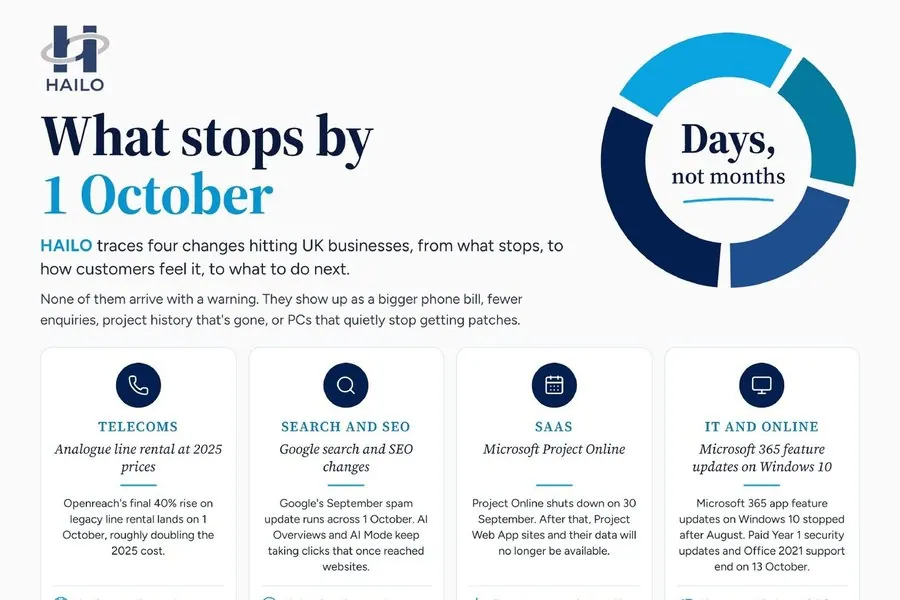
What stops by 1 October, and how customers feel it
Four changes hitting UK businesses around 1 October: what stops, how customers feel it, and what to do this week.
BlogInsight
SystemsNobody decided to run the business on forty spreadsheets. It happened one reasonable file at a time. Here is how to find the ones that are costing you, and how to retire them in the right order.
By HAILO · 7 min readAsk a small-business owner how many spreadsheets their business depends on and you will usually get a laugh, then a guess, then a much larger real number. There is the stock reconciliation one. The rota. The commission calculator. The one that turns the POS export into something the accountant will accept. The pricing model with the tab everyone is told not to touch.
Each was a sensible fix at the time. Someone needed an answer, a spreadsheet gave it to them in an afternoon, and no procurement approval was required. That is exactly why spreadsheet sprawl is so common in growing businesses, and exactly why it is so rarely dealt with until something breaks.
Spreadsheet sprawl is the point at which core business processes are running on an undocumented, unowned set of files that has grown past anyone's ability to hold in their head. It is not a technology problem. It is a governance problem wearing a technology costume.
You can usually tell you have it when three or more of these are true:
The obvious cost is time, taken up by the re-keying, the reconciling, the chasing of the person who has the current version. That is real, and for most businesses it is measured in hours per week per person, not minutes.
But the expensive part is the decisions. When the numbers take three days to assemble, you do not check them often. When you do not check them often, problems run for weeks before anyone notices. A margin slipping on one line, waste creeping up on one site, a customer whose order rate quietly halved. By the time month-end shows it, the month is gone.
Then there is concentration risk. In most SMBs, spreadsheet sprawl and key-person risk are the same problem seen from two angles: the workbook is complicated because the person who built it is competent, and the business is exposed because nobody else can maintain it. When that person leaves, retires, or is simply on holiday during a bad week, a core process stops.
And there is the compliance edge. If any of those files hold personal data, such as customer lists, employee records, or applicant details, sprawl means you cannot answer basic UK GDPR questions with confidence: where is it, who can see it, and when does it get deleted?
List every spreadsheet that a business process depends on. For each one capture five things: who owns it, who else uses it, how often it is updated, where its data comes from, and what breaks if it is wrong. This takes a couple of days and it is the only step you cannot skip. Most businesses find between fifteen and sixty files; almost everyone is surprised by the number.
Not every spreadsheet is a problem, and replacing all of them is neither possible nor desirable.
This is where consolidation projects fail. Before you connect anything, agree what the words mean. Does "revenue" include VAT? Is a "customer" the account or the site? Does a job count on the day it is booked or the day it is delivered? If two spreadsheets disagree, it is usually because two people answered these questions differently and neither was wrong.
Get the definitions written down and agreed. Automating conflicting definitions just produces disagreement at higher speed.
Most SMBs are paying for far more capability than they use. The CRM, the accounting package, the booking system and the POS between them usually hold most of what the spreadsheets are duplicating; they just are not joined up, so a human is acting as the integration layer.
Start with the two or three highest-cost workflows from your audit and connect those properly, so data moves once, automatically, in one direction, with a clear source of truth. That is the core of the connected stack, and it usually removes more manual work than any new purchase would.
Once the data flows on its own, stop producing reports nobody reads and start producing alerts somebody acts on. A daily sales feed, a margin check, and an alert when a number crosses a threshold you care about will change more behaviour than a fifteen-tab monthly pack. This is what we mean by Human Accelerated Insights: the number a decision needs, in front of the person making it, on the day it matters.
| Before | After |
|---|---|
| Data re-keyed between systems weekly | Data moves once, automatically |
| Several conflicting versions of a number | One agreed definition, one source |
| Month-end reconciliation takes days | Reconciliation is a check, not a rebuild |
| One person understands the workbook | The logic is documented and owned by the business |
| Problems surface at month-end | Exceptions surface the same day |
Note what is not on that list: "everyone uses a new system". You can fix spreadsheet sprawl without a platform migration, and for most SMBs that is both cheaper and far more likely to actually happen.
Pick the single spreadsheet that would cause the most disruption if it were lost tomorrow. Write down who maintains it, what feeds it, and what depends on it. If you cannot fill in all three from memory, you have found your starting point, and probably your biggest concentration risk at the same time.
The diagnostic puts a number on the hours and margin leaking out of your current process, before you commit to changing anything.

Human Accelerated Insights for Lean Operations
What stops by 1 October, and how customers feel it
Four changes hitting UK businesses around 1 October: what stops, how customers feel it, and what to do this week.
How to choose an operations consultancy for a UK SMB
A buyer's guide to operations consultancies for UK SMBs: the five types of provider, what each costs, and the questions that separate them.
How to improve efficiency without hiring more staff
Capacity, not headcount. A guide for UK SMBs on finding the hours already inside the business: where to look and what to automate first.